Why do you enroll in an advanced Excel course in Pune?
In Maharashtra, we see companies transition to data-driven decision-making for everyday operations. Hence, it is very much so for the individual, whether a fresher or a working professional, to get in on spreadsheet training, which will in turn help them manage data and come up with business intelligence for key decisions. Get the best advanced Excel course in Pune at SevenMentor to empower yourself with the latest features of the software to process large data, reduce human errors, and manage your work in the most efficient manner.
By choosing the best advanced Excel training institute in Pune, SevenMentor, the candidate will be able to learn advanced predictive models on top of basic data tracking. Corporates are today looking for candidates who can convert data into business strategies, and hence, by gaining expertise in advanced Excel tools and techniques, candidates will be able to get the best jobs in top IT and corporate sectors in Pune.
- Increase in Workplace Productivity: Complete hours of work in just a few minutes.
- High-Demand Career Opportunities: Specialized Data Analysis & Financial Modeling jobs, Market & Business Research jobs, Corporate Operations jobs, and many more in the thriving IT & Corporate sector of Pune.
- Ability to Develop: Enhanced Analytical Mindset—Move from simple calculations to simple data analysis & forecasts to support business growth using trends, patterns & financial forecasting.
- Error-Free Data Management: Use the audit and validation tool to ensure 100% accuracy of data.
What Core Concepts are Covered in the Best Advanced Excel Training in Pune?
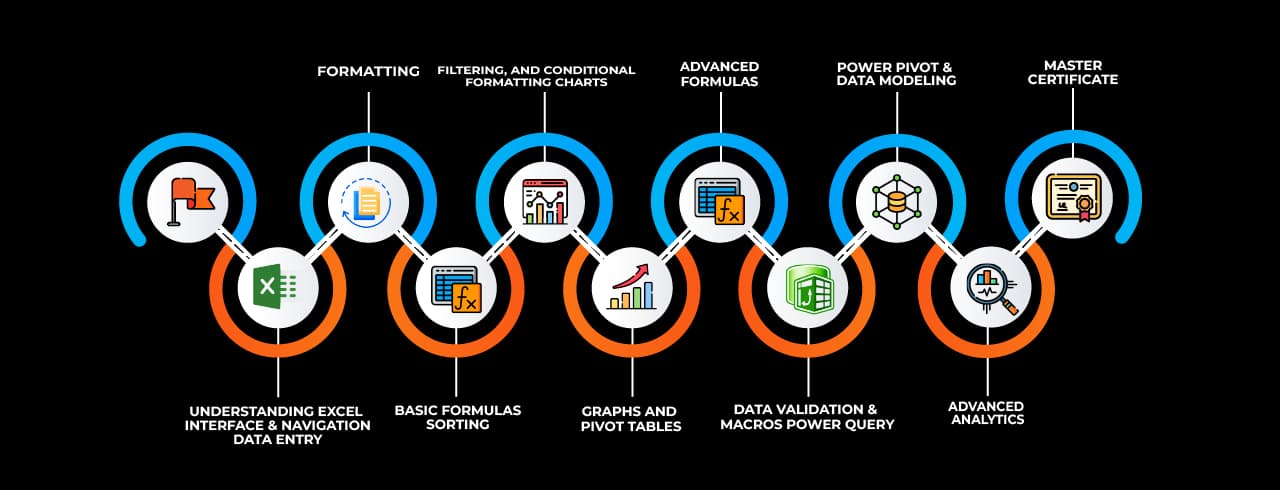
A comprehensive curriculum to differentiate from basic tutorials to advanced Excel training. Best advanced Excel classes in Pune by SevenMentor. Our team has designed the most comprehensive curriculum for intermediate-level students to develop expertise in data architecture using advanced Excel training in Pune. In the program, our experts at SevenMentor will teach complex formulas, workflows, and relational databases with in-depth knowledge. Instead of just teaching formulas, we explain the logic of data modeling and the application of the right analytical technique to solve real-life corporate problems.
Our advanced Excel training in Pune is designed with a view to imparting the knowledge to the trainees on the various business intelligence features of Microsoft Excel and how to apply them in handling complex reporting in a large organization. Our advanced Excel classes in Pune are designed with a structured approach that would enable students to gain hands-on experience in all the features of Microsoft Excel.
- Advanced Formulas & Nesting: In depth we will cover the use of logical and lookup functions, which include INDEX-MATCH, XLOOKUP, SUMPRODUCT, and INDIRECT as well as dynamic array formulas like GMAN and XMOL, and we will also go through practical examples, which will help you to improve your skill in formula writing for the purpose of solving complex issues in data analysis.
- Power Query & Data Transformation: Learn how to access external sources, transform and clean the data, and then put it into your file without changing the original data.
- Power Pivot and Data Modeling: We'll cover creating data models, joining tables, and managing very large data sets of millions of rows.
- Interactive Dashboard Creation: See how to create very dynamic and interactive reports that include advanced conditional formatting, interactive charts, slicers and timelines in your spreadsheets.
How Do Excel Automation and VBA Scripting Transform Your Workflow?
An expert spreadsheet user makes the best use of software to do most of the work. Most data practices involve a lot of repetitive work on a daily basis, such as copying and pasting data in reports on a daily basis, formatting reports on a regular basis, or even running the same calculations on a weekly basis. Our Advanced Excel Course in Pune with Placement focuses on the automation of all such repetitive tasks by creating macros and by writing and modifying VBA code.
VBA and macros are very powerful tools in Pune’s workplace. VBA and macros help a spreadsheet user to perform very complex and time-consuming work and thus greatly enhance a user’s technical capabilities at the workplace and help in switching over from a data entry operator to an automation specialist in a very short span of time, and thus command on VBA and macros commands will give a user a great advantage in his/her placement in a job.
- Automate Repetitive Tasks: Create custom macros for your Advanced Excel Training in Pune that can format, calculate, and compile reports for your weekly and monthly operations in minutes.
- Develop Custom User Functions: This will allow you to create your own formula that you can use within any Excel spreadsheet. Often there are calculations that can be done in Excel, but sometimes it is just better to write your own formula in VBA to make it easier to manage.
- Cross-Application Integration:Automate import and report generation from Excel data into other Microsoft Office applications like PowerPoint and Outlook. We create and send out automated reports, charts, presentations, and emails based on what specific data has changed in Excel.
- User-Friendly Control Interface: We have user forms, command buttons, and auto data entry worksheets, which in turn protect your core data workbooks from other users’ changes.
What makes SevenMentor the best advanced Excel training institute in Pune?
The key to acquiring data skills is the right partner to impart education. SevenMentor is the best advanced Excel training institute in Pune, as we deliver more practical & job-oriented training over theoretical knowledge of textbooks. We understand that complex corporate tools like Advanced Excel cannot be made students' to learn by just listening to lectures. Therefore, all our training sessions are conducted by live projects. Our learning environment and the latest infrastructure of training labs are best to carry out a deep level of data analysis.
The pool of seasoned industry experts who comprise SevenMentor’s faculty are the best Advanced Excel trainers in Pune. The greatest strength of SevenMentor’s team of trainers is their vast repository of experience that has been garnered from having spent years in the corporate world. This is what they bring to the classroom, and that’s what makes them the best. Small batches of students are mentored to perfection by the faculty at SevenMentor, who guide them through the learning process and help them to absorb the complex data skills that they so desperately need to acquire.
- Industry-Experienced Mentors: We have the best team of industry-experienced mentors comprising corporate trainers, data consultants, and subject matter experts. They have years of real-world experience and have hands-on knowledge of the advanced Excel data skills that top employers in Pune, Mumbai, etc. expect from their employees.
- 100% Practical Learning: In class, you will work with live, enterprise datasets in real, simulation-based scenarios and problems in day-to-day work life.
- Flexible Timing for Batches: We have devised and operationalized our plans for holding batches on weekdays as well as on weekends, which allows working students of Pune the very best option of attending to their formal training while at the same time catering to their respective occupations as well.
- Study Materials: The best study materials are provided for students, which include digital study material, a practice workbook, and advanced macro scripts for a lifetime.
How Does an Advanced Excel Course in Pune with Placement Boost Your Career?
Pivoting to a new career using newly acquired technical skills is as challenging as mastering those skills in the first place. By choosing to learn Advanced Excel with Placement Support for Placement in Pune by SevenMentor, you can immediately look for jobs in big MNCs, IT companies, and financial services firms in Hinjawadi, Magarpatta, and Kharadi. We also give our students an optimum amount of aid and support in order to get them placed in the best companies, and that too within the shortest span of time, by conducting mock interviews, resume help, etc., and also by conducting campus placement drives in all 3 locations mentioned above.
A globally recognized certification in data skills to put on your resume increases your chances of getting hired by companies across the world. It also instantly elevates your profile amongst potential employers for high-end data analytics and management roles.
- Dedicated Placement Support: Get assistance for mock interviews, resume writing, and a host of other services along with a campus drive for placement in top MNCs and companies in Hinjawadi, Magarpatta, Kharadi, etc., in Pune.
- Resume Optimization: Our experienced team will teach you to list out high-value skills (like Power Query, VBA scripting, and building dashboards) to get past the applicant tracking system (ATS) in order to get an interview.
- Technical Interview Test: Practicing solving various corporate-level machine tests on large datasets within the time frame to build confidence.
- Earn salaries of Data Analyst, MIS Specialist, Financial Modeler & Business Intelligence Executive and many more high-paying jobs.
What are the Benefits of Choosing Online Advanced Excel Classes in Pune?
SevenMentor brings to you Online Advanced Excel Training in Excel in Pune, equivalent to the traditional classroom coaching, and that too at premium. With cutting-edge technology of screen sharing, cloud-based interactive workbooks, and live virtual training rooms, SevenMentor brings to you live online classes of advanced Excel.
SevenMentor brings the highest quality of skill development for working individuals & students in Pune through an online advanced Excel training program. This advanced online Excel course in Pune is delivered via advanced screen sharing, interaction using cloud-based workbooks, and collaborative work in a virtual classroom environment.
• Live Interactive Classrooms: Ask questions, share your screen for instant troubleshooting, and collaborate on data models in real time.
Anywhere Access to Live Classes we bring high quality live classes to the student from any part of Pune, any part of Maharashtra as well as out of state. He saves his time while traveling.
24/7 Access to Learning Portal: Re-watch recorded lectures, download updated practice sheets, and submit assignments from our Learning Portal at any time.
Save Your Money: Save on the Cost of Learning by Removing Costs of Travel, Printed Study Material, etc., and Getting the Best Corporate Training.
A very strategic section of your landing page. This will turn all the potential student’s doubts into major selling points for SevenMentor’s services.
How Does SevenMentor Resolve Common Advanced Excel Training Challenges?
We at SevenMentor know how demotivating it can be for a student when he’s stuck between searching for the right training center & the fear of it, be it due to uncertain timing of classes, unorthodox methods of a faculty & empty promises of a job after completion of a course. All these problems that crop up during training programs are industry-wide and thus are unavoidable. But here at SevenMentor, we have devised a model of training students going for our Advanced Excel Training in Pune, which takes care of all such problems & makes sure that all investments made by studentss translate into the best of corporate skills.
From student-centric course structure to quality and reliability of learning environment, our premium model of training ensures that students get maximum out of their training money. The following are the guarantees of 7Mentor’s reliability.
Guaranteed Learning Modes: We honor your choice. If you enroll for an in-person classroom experience at our Advanced Excel Training Centers in Pune, your batch will remain strictly offline with face-to-face faculty mentorship, and there will be no online mixed-up scenario for you.
- Elite Corporate Faculty: Our data experts are certified and have been through a rigorous quality check process to guarantee the best training on complex topics like VBA scripting, etc., in a patient and methodical manner and also have doubt-clearing sessions on a regular basis.
- Proven Placement: Our dedicated Placement Cell will get you interview opportunities that are relevant for the profile of Advanced Excel and Data Analyst, unlike other centers that promise data entry jobs and keep sending their students for the same.
- Student-Centric Organization: At SevenMentor, we are very transparent with regard to our batch schedules right from the time of our initial communication, and the enrollment process is very straightforward. We keep our promises, and that’s what makes our students happy and run smoothly without any hiccups or shocks. The additional module will help students to get additional support to get placed in global technologies. It helps students to understand various domains like data science, data analytics, business intelligence, VBA development, and cloud computing and link the various concepts of Advanced Excel to various global technologies.
How Does Advanced Excel Connect with Other High-Demand Technical Courses?
Learning to create a perfect spreadsheet architecture is often considered the last step to get a bigger job in the IT industry. At SevenMentor, we believe that modern business runs on top of software, databases, and automation tools. Building a strong spreadsheet is the base to become an analytical person and can be easily shifted to other high-end technologies of enterprise, like cloud architecture, intelligence engineering, and ERP. Thus, at our Advanced Excel training institute in Pune, our goal is to train participants to become very good analytical people and help them to climb up the corporate ladder by offering training on high-end technologies.
To scale up your corporate profile, SevenMentor has a repertoire of very advanced programs. Since a program in Excel is integrated with the high-end domains of technology, the learner can have multidimensional career growth.
- Data Science & Data Analytics: Become a data scientist and build data-driven web applications or a data analyst and analyze user behavior and system performance.
- Python & Java Development: Use your experience with logical formatting for developing backends with Python, which is extremely popular, or develop large-scale web applications with Java for enterprise use.
- Generative AI ChatGPT Courses: We have courses that will help you to increase your productivity in your workflow with generative AI or that will teach you how to use chatbots with AI in ChatGPT.
- Power BI and Salesforce CRM: Use Power BI for great reports and dashboards or go big with enterprise CRM solutions like Salesforce for a full scale web application.
- Cloud Computing, DevOps & Cyber Security: Learn how to scale up deployment of your web application with Cloud Computing, manage your continuous integration and testing with DevOps, and protect your web application from cyber threats with Cyber Security.
- SAP Enterprise Solutions: Link relational database-based logistics to enterprise business solutions by managing them with SAP Enterprise Solutions.
Got Questions? Here Are Some FAQs
1. What will I learn in an advanced Excel training course?
Our most advanced Excel training course covers topics such as formulas, pivot tables, pivot charts, VLOOKUP and XLOOKUP functions, creating dashboards, data validation, conditional formatting, creating and using macros, as well as other data analysis techniques.
2. Is Advanced Excel useful for beginners?
Yes, but it is recommended to have basic knowledge of using Excel as the course will progress gradually to introduce the students to advanced features of Excel and how to apply them.
3. How long does it take to complete Advanced Excel Training?
The length of time required to complete most of the advanced Excel courses is a few weeks.
4. What career opportunities can advanced Excel skills provide?
Skills in advanced Excel are very useful for persons in data analysis, finance, accounting, HR, operations, administration, and business reporting roles.
5. Will I receive a certificate after completing Advanced Excel Training?
Yes, most of the training institutes provide a certificate of completion of the course. It can be a valuable addition to your resume and online profile.
 Build expert-level Excel skills with SevenMentor’s Advanced Excel Course.
 Master data analysis, automation, and visualization techniques to enhance efficiency.
 Gain the confidence to tackle complex Excel tasks and advance your career opportunities.
 Pivot TablesSummarize, analyze, and visualize large datasets with interactive tables.
 Power QueryAutomate data import, transformation, and cleaning from multiple sources.
 Power Pivot Perform advanced data modeling and analysis using DAX formulas.
 Data ValidationControl and restrict data entry with rules and dropdown lists.
 Conditional Formatting Highlight data based on conditions using colors, icons, and bars.
 Solver Optimize decision-making by finding the best solution for complex problems.
 Goal SeekAdjust input values to achieve a specific target outcome in formulas.
 What-If AnalysisSimulate different scenarios by changing input values dynamically.
 MacrosAutomate repetitive tasks using VBA to enhance productivity.
 Data TablesAnalyze multiple outcomes of formulas by varying input values.
 Text to Columns Split text into separate columns based on delimiters or fixed width.
 Flash Fill Automatically recognize and complete patterns in data formatting.
 Charts & Graphs Visually represent data insights using various chart types.
 Remove Duplicates Eliminate duplicate records to maintain clean and unique data.
 Name ManagerDefine and manage named ranges for easier formula referencing.
 Dynamic ArraysUse formulas that automatically expand to return multiple results.