UI/UX Design Course in Pune

feature-icon Accelerate Your Career with SevenMentor’s Real-World UI/UX Expertise
feature-iconMaster UI/UX Design with Hands-On Training from Industry Experts
feature-iconCreate Engaging and User-Centric Designs with In-Demand UI/UX Skills

02071172977

Start Today!

CONSULT WITH
OUR ADVISORS

  • Course & Curriculum Details
  • Flexible Learning Options
  • Affordable Learning
  • Enrollment Process
  • Career Guidance
  • Internship Opportunities
  • General Communication
  • Certification Benefits

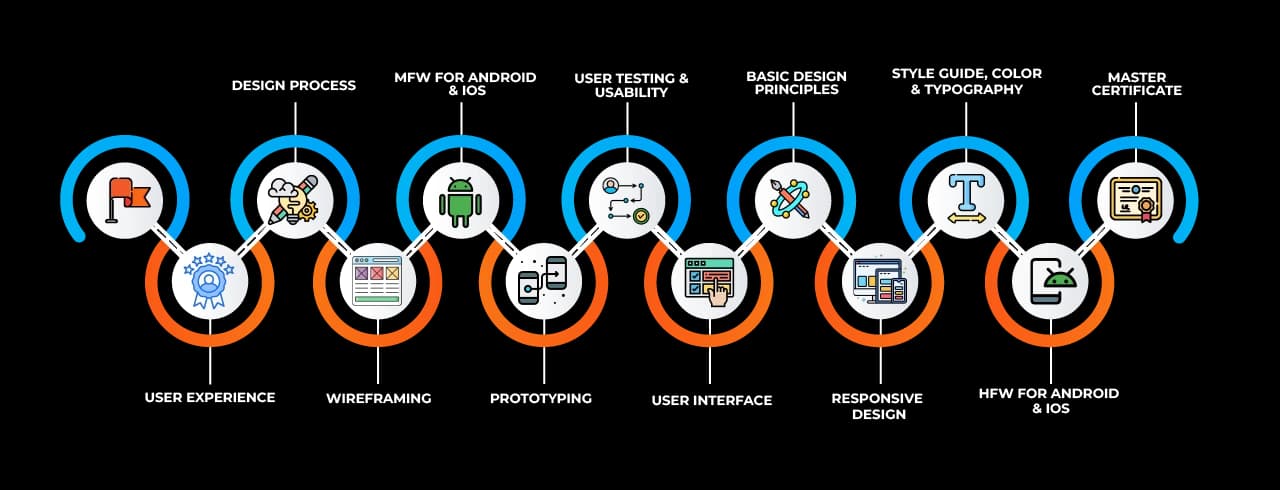
Learning Curve for UI/UX

Learning curve for UI/UX

Master In UI/UX Course

OneCourseMultipleRoles

Empower your career with in-demand data skills and open doors to top-tier opportunities.

UI/UX Developer
UI/UX Designer
Web Designer
UI Designer
Graphics & UI Designer
Interaction Designer (IxD)
UX Researche
Visual Designer
UX Writer
Design System Manager
Senior UX/UI Designer
Lead Product Designer
Creative Director (UX/UI)
UI/UX Intern (Entry-Level)
UX/UI Consultant
Information Architecture (IA)
User Interface Architect
UX Design Systems Manager

Skills & Tools You'll Learn -

Wireframing & Prototyping iconWireframing & PrototypingCreating low- and high-fidelity designs using tools like Figma, Adobe XD, Sketch, Balsamiq, Miro, and Material Design. Sketching Layouts and Flow Diagrams – Hand-drawing initial design concepts and user flows to map out interactions.
Visual Design iconVisual Design Crafting aesthetically pleasing and functional designs using typography, color theory, and branding principles.
User Research iconUser ResearchUnderstanding user needs, behaviors, and pain points through qualitative and quantitative research methods.
Usability Testing iconUsability Testing Evaluating designs through user feedback and testing to improve usability and experience.
Responsive Design iconResponsive Design Ensuring designs adapt seamlessly across various screen sizes and devices
Sketching Layouts iconSketching Layouts A vector-based design tool popular for UI/UX design, known for its simplicity, plugins, and smooth workflow for macOS users.
Interaction Design iconInteraction DesignDesigning interactive elements and micro-interactions to enhance user engagement.
Information Architecture  iconInformation Architecture Structuring and organizing content for intuitive navigation and usability.
Collaboration & Sharing iconCollaboration & SharingSharing reports, dashboards, and insights with stakeholders.

Why Choose SevenMentor UI/UX

Empowering Careers with Industry-Ready Skills.

Specialized Pocket Friendly Programs as per your requirements

Specialized Pocket Friendly Programs as per your requirements

Live Projects With Hands-on Experience

Live Projects With Hands-on Experience

Corporate Soft-skills & Personality Building Sessions

Corporate Soft-skills & Personality Building Sessions

Digital Online, Classroom, Hybrid Batches

Digital Online, Classroom, Hybrid Batches

Interview Calls Assistance & Mock Sessions

Interview Calls Assistance & Mock Sessions

1:1 Mentorship when required

1:1 Mentorship when required

Industry Experienced Trainers

Industry Experienced Trainers

Class Recordings for Missed Classes

Class Recordings for Missed Classes

1 Year FREE Repeat Option

1 Year FREE Repeat Option

Bonus Resources

Bonus Resources

Curriculum For UI/UX

BATCH SCHEDULE

UI/UX Course

Find Your Perfect Training Session

May 3 - May 9

2 sessions
03
Sun
Classroom/ Online
Weekend Batch
09
Sat
Classroom/ Online
Weekend Batch

May 10 - May 16

1 sessions
11
Mon
Classroom/ Online
Regular Batch

May 17 - May 23

1 sessions
18
Mon
Classroom/ Online
Regular Batch

Learning Comes Alive Through Hands-On PROJECTS!

Comprehensive Training Programs Designed to Elevate Your Career

Holo Shop – Grocery App

Holo Shop – Grocery App

Glamkart – Beauty Product Selling App

Glamkart – Beauty Product Selling App

FreshBasket – Grocery App

FreshBasket – Grocery App

Furniflex – Online Furniture Selling App

Furniflex – Online Furniture Selling App

Evergreen – Online Plant Selling App (Nursery)

Evergreen – Online Plant Selling App (Nursery)

No active project selected.

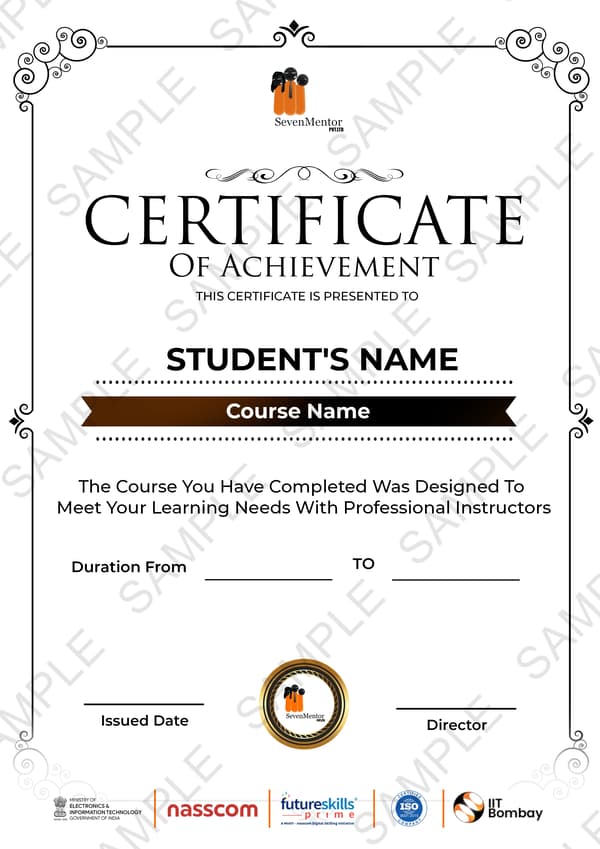
Transform Your Future with Elite Certification

Add Our Training Certificate In Your LinkedIn ProfileLinkedIn

Our industry-relevant certification equips you with essential skills required to succeed in a highly dynamic job market.

Join us and be part of over 50,000 successful certified graduates.

Student 1
Student 2
Student 3
Student 4
Student 5
Join 15,258 others learning today
Certificate Preview

KEY Features that Makes Us Better and Best FIT For You

Expert Trainers

Industry professionals with extensive experience to guide your learning journey.

Comprehensive Curriculum

In-depth courses designed to meet current industry standards and trends.

Hands-on Training

Real-world projects and practical sessions to enhance learning outcomes.

Flexible Schedules

Options for weekday, weekend, and online batches to suit your convenience.

Industry-Recognized Certifications

Globally accepted credentials to boost your career prospects.

State-of-the-Art Infrastructure

Modern facilities and tools for an engaging learning experience.

100% Placement Assistance

Dedicated support to help you secure your dream job.

Affordable Fees

Quality training at competitive prices with flexible payment options.

Lifetime Access to Learning Materials

Revisit course content anytime for continuous learning.

Personalized Attention

Small batch sizes for individualized mentoring and guidance.

Diverse Course Offerings

A wide range of programs in IT, business, design, and more.

Course Content

Why a UI/UX Design Course in Pune is Your Entry into the Digital Economy

The world stopped "going digital" a long time ago, and now it is just the standard reality. Every app that feels smooth or easy to navigate is the result of a deliberate plan and not just some happy accident. When you sign up for a UI/UX Design Course, you are basically learning to translate human needs into machine language. This field is far more than just "making things pretty" because it is actually about solving deep frustrations and creating flow. 


At SevenMentor Institute, we break down the wall between the two most important pillars of the web. First, there is User Experience (UX)—which is the "brain" of the operation. It’s the logic and the journey that guide a user to their goal without them getting frustrated. Then, there is the User Interface (UI)—the "face" of the application created with tools like HTML5 and CSS3. Whether you are a total beginner or someone looking to switch careers, our UI/UX Design Training in Pune is built to turn your creative spark into a professional-grade skill set. In a market where recruiters want designers who actually understand branding and layout, we give you the technical edge to stand out.


Mastering the Tools OF UI UX: 

A common question we hear at our UI/UX Design Classes in Pune is: "Do I need to be a coder to be a designer?" The short answer is no, but the real answer is that knowing the "bones" of the web makes you a 10x better designer. Our curriculum at SevenMentor Institute is unique because we bridge the gap between Graphic Design and Web Development. We don't just teach you to draw; we teach you how those drawings become living, breathing websites.


To be a pro in 2026, you need mastery over the "Big Three" of the design world:

Adobe Photoshop: Adobe and specifically the Photoshop tool remains an absolute standard for raster graphics, and it is the primary engine for anyone who needs to composite images, retouch photos, or build out a mobile interface.


Adobe Illustrator: Illustrator by Adobe, which is now open-source, is where you handle vectors, and it allows you to scale a tiny icon up to the size of a giant billboard without losing any quality or seeing a single pixel. It is the go-to tool for logos and icons and complex illustrations that need to stay sharp.


CorelDraw: Known for its incredible speed and interface customization, CorelDraw is a favorite for designers who need to produce high-dynamic results quickly, especially in branding and print layout.


By joining the Best UI/UX Design Courses in Pune with Placements, you aren't just learning software; you’re learning a workflow. We start with the basics of HTML and CSS so you understand the "grid" you’re designing for, and then we move into the advanced artistry of the Adobe suite. This dual-threat capability is exactly what top-tier companies are looking for when they hire from a UI/UX Design Training Institute in Pune.


How To Connect UI UX Training To HTML5, CSS3, and JavaScript?

A lot of people think that if they can use Photoshop, they are "done." But at the IT Education Center, we believe that a designer who doesn't understand the code is like an architect who doesn't understand bricks. Our UI/UX Design Training in Pune ensures you aren't just handing over a picture to the developers; you’re handing over a blueprint that actually works.


Every designer needs to understand the "bones" of the web, and that starts with HTML5. It provides the actual structure for every site you visit, and it acts as the foundation for everything else. But a foundation needs a visual layer, and that is why we move into CSS3. This is the part where you define the look and feel, the animations, or the responsiveness so that a site works perfectly on a phone, a tablet, and a desktop. 


Finally, we layer in JavaScript. In the current market, JavaScript is non-negotiable. It’s the "brain" that handles the interaction—the pop-ups, the form validations, and the dynamic content. When you join our UI/UX Design Classes in Pune, you learn to use these three tools together to build "eye-cache" websites that are as functional as they are beautiful.


Deep-Diving into the Industry-Standard Software

To be a professional designer, you need more than just "creativity"—you need technical mastery over the tools that top-tier MNCs use every day. Our UI/UX Design Course in Pune doesn't just skim the surface of these apps; we get into the advanced workflows that save time and produce high-end results.


Adobe Photoshop for UI Artists: We move past basic cropping. You’ll learn about alpha compositing, luminance masking, and 3D rendering. It’s the benchmark for image editing, and we show you how to use it for everything from mobile app icons to complex website banners.


Adobe Illustrator for Scalable Design: Since it’s vector-based, Illustrator allows you to create artwork that stays "pixel-perfect" whether it’s on a tiny smartphone screen or a massive billboard. We focus on the "mathematical" Cartesian system so you can draw sharp, crisp lines with zero risk of overdrawing.


CorelDraw for Dynamic Results: Often overlooked by beginners, CorelDraw is a beast when it comes to speed and interface customization. It’s a favorite in the UI UX design because of its unique tools like Twirl, Smear, and the Barcode wizard—features that give you full control over vector objects without the restrictions of other software.

When you master this technical stack at the IT Education Center, you stop being a basic designer and you start becoming a "Design Polymath." You aren't just picking up a digital brush, but you are learning how to construct an entire visual brand from nothing and making it work in the real world. 


What Are The Career Choices And Salary After This UI UX Course?

The demand for designers is not even up for debate anymore, and the real question is whether you have the skills to fill that void. As everything from your bank to your grocery store moves into the cloud, companies need people who can connect cold code to human emotion, and that need is at an all-time high. A UI/UX Design Course in Pune is about your portfolio and your paycheck, and not just a piece of paper. 

Entry-Level Roles: Freshers who can show a deep understanding of user journeys can expect to start around Rupees 25,000 or even reach up to 35K per month.

Career Progression: Once you get some real wins and some actual project experience, those numbers jump quickly into the salary compensation of ₹50K or more bracket.

Diverse Titles: You could end up as a Web Designer, a UX Researcher, a Layout Planner, or even a Design Tester, depending on where your strengths lie.

The Portfolio Edge: Companies today are over the "degree" obsession. They want to see your GitHub, your Behance, and your live prototypes. This is why our UI/UX Design Classes in Pune with job placement focus 100% on building that digital proof of your skills.


Flexible Online UI/UX Classes:

We know that for many, the commute is a dealbreaker. Our Online UI/UX classes in Pune are designed to bring the lab to your living room without losing the "live" energy. These aren't just boring webinars; you get hands-on experience with Photoshop, Illustrator, and InDesign through real-time screen sharing and collaborative debugging. It’s the same deep-dive curriculum, just adapted for a remote world. You get the flexibility to learn from anywhere while still getting the "pressure-training" needed to land a high-end corporate role.


Results-Driven Corporate UI/UX Training:

For businesses, a clunky website isn't just an eyesore—it’s a revenue killer. Our Corporate UI/UX Training in Pune is built to help your existing team sharpen their design instincts and master the latest tools. We dump the usual student fluff, and we get straight to the pain points of your specific product. Whether your team needs to fix a clunky mobile menu or redesign a whole client portal, we provide the practical training that helps your employees increase engagement and drive the bottom line. 


Frequently Asked Questions

Everything you need to know about our revolutionary job platform

1

What is the PayScale Of UI/UX Designer?

Ans:
Entry-Level UX Design Salary: ₹25,000-₹35,000 Mid-level: ₹35,000-₹50,000 Senior level: ₹50,000 & plus
2

Do I need to learn any programming languages?

Ans:
No, UX designers don’t need to learn any programming language. It Gives You Advantages as a UX Designer.
3

Is it compulsory to get a job in UI/UX Designer?

Ans:
Companies and clients are more interested in portfolios than degrees. But It Gives You the Advantage to get a job, or to get a hike in salary.
4

Career Scope in Ui/UX designing?

Ans:
There is a lot of scope in this field as The demand for designers is increasing daily, and now everything is getting converted into the digital world so the need for UI/UX designers is increasing.
5

What is a UI/UX course?

Ans:
UI/UX Design course gives you all the information about all aspects of user interface and user experience design to make you job-ready. While UI design is about the look and feel of the website or app, UX design improves the overall experience of the users while browsing the website or app.
6

What is the difference between UI and UX design?

Ans:
UI (User Interface) focuses on the look and feel of a product, while UX (User Experience) is about the overall functionality and user satisfaction when interacting with the product.
7

Do I need any prior design knowledge to join the UI/UX course?

Ans:
No prior design experience is necessary, but familiarity with basic design principles can be helpful. The course will cover all essential concepts from scratch.
8

What tools will I learn in this UI/UX course?

Ans:
You will learn industry-standard tools like Figma, Notion, Mobbin, Whimsical, Photoshop, and Illustrator, along with HTML, CSS, and Bootstrap for front-end development.
9

Will I learn how to create prototypes and wireframes?

Ans:
Yes, the course includes modules on creating interactive prototypes using Figma and wireframes using tools like Whimsical.
10

Is coding knowledge required for UI/UX design?

Ans:
Basic knowledge of HTML and CSS is beneficial but not mandatory. The course covers the essentials needed for designing responsive web pages.
11

Will this course help me build a portfolio?

Ans:
Yes, the course includes hands-on projects that will help you build a professional portfolio showcasing your UI/UX design skills.
12

What career opportunities are available after completing this course?

Ans:
Graduates can pursue roles like UI Designer, UX Designer, Product Designer, Interaction Designer, and Front-End Developer.
13

Is this course suitable for beginners?

Ans:
Yes, this course is designed for beginners as well as professionals looking to enhance their UI/UX design skills.
14

Will I receive a certification upon completion?

Ans:
Yes, you will receive a certificate upon successful completion of the course, which can enhance your professional credentials.
15

Are there any live projects or internships included in the course?

Ans:
Some courses may offer live projects or internship opportunities to provide real-world experience. Check the specific course details for availability.

Explore Other Demanding Courses

No demanding courses available at the moment.

Debug: courses prop type: object, isArray: yes, length: 0