Linux Training in Mumbai
 Unlock Your Linux Potential And Elevate Your IT Career To New Heights
 Develop Expertise In Server Management, Network Configuration, And Automation
 Start Your Journey Toward Becoming A Linux Expert With The Leading Program Today
Start Today!
CONSULT WITH OUR ADVISORS
- Course & Curriculum Details
- Flexible Learning Options
- Affordable Learning
- Enrollment Process
- Career Guidance
- Internship Opportunities
- General Communication
- Certification Benefits
Request Call Back
Learning Curve for Linux in Mumbai
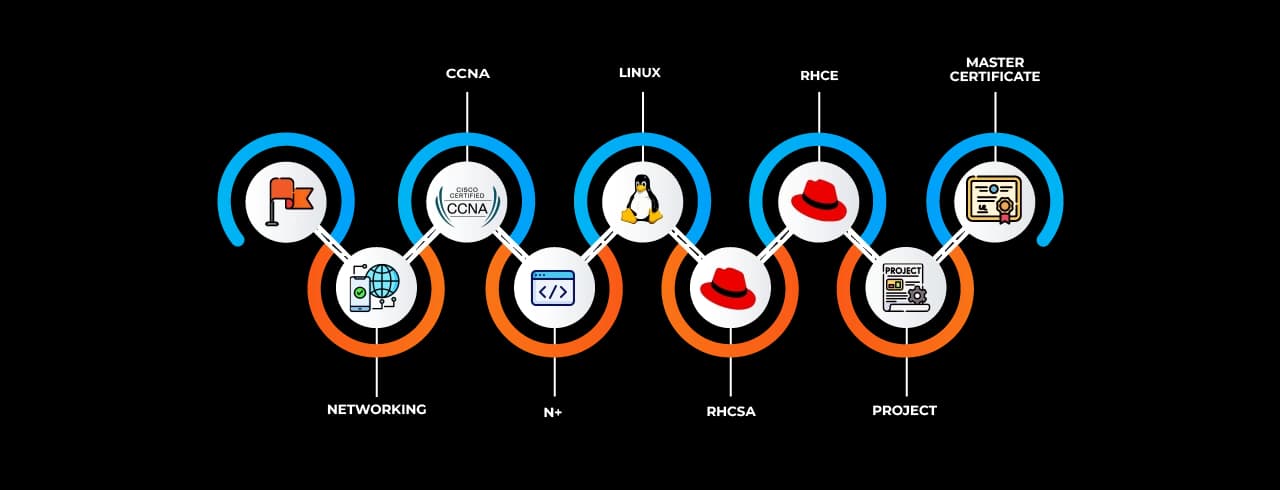
Master In Linux in Mumbai Course
OneCourseMultipleRoles
Empower your career with in-demand data skills and open doors to top-tier opportunities.
Skills & Tools You'll Learn -
 Manage Linux networking Configure IP addresses, routing, and network interfaces using nmcli and ip commands.
 Access Linux file systemsMount, unmount, and navigate file systems using mount, umount, and df.
 Manage local users and groupsCreate, modify, and delete users and groups using useradd, usermod, and groupadd.
 Analyze and store log filesView and manage logs using journalctl, dmesg, and /var/log/ files.
 Manage network securityHarden network security using firewalld, iptables, and SELinux policies.
 Manage and secure files and file systemsImplement encryption, permissions, and ACLs for file security.
 Review the system log filesTroubleshoot and audit logs using journalctl and log analysis tools.
 Control services and daemonsManage system services using systemctl and service commands.
 RHCSACovers fundamental Linux system administration tasks, including user management, file permissions, and networking.
 RHCEFocuses on advanced Linux system administration, automation, and enterprise networking concepts.
 History of LinuxOriginated in 1991 by Linus Torvalds, Linux evolved into a powerful open-source operating system.
 Create, view, and edit text filesUse tools like vim, nano, and cat to manage text files.
 Monitor and manage Linux processesUse ps, top, htop, and kill to monitor and control processes.
 Control access to files with file system permissionsSet file and directory permissions with chmod, chown, and umask.
 Configure and secure the OpenSSH serviceSecure remote access using sshd_config and key-based authentication.
 Managing physical storagePartition and format storage devices using fdisk, parted, and mkfs.
 Install and update software packagesUse dnf or yum to install, update, and remove packages.
 Establish network connections and control firewall restrictionsUse firewall and iptables to manage network security.
 Monitor and manage running processesTrack system performance with top, htop, and nice/renice commands.
 Troubleshoot problems and analyze systems with Red Hat InsightsUse Red Hat’s proactive security and performance analysis tool.
 Remotely manage systems with SSH and the Web ConsoleAdminister servers securely via SSH and Cockpit web UI.
 Schedule future tasksAutomate tasks using cron and at scheduling commands.
 Tune system performanceOptimize system resources with sysctl, ulimit, and performance monitoring tools.Control access to files with ACLsImplement fine-grained access control with setfacl and getfacl.
 Manage SELinux securityEnforce mandatory access controls using getenforce, setenforce, and semanage.
 Maintain basic storageManage disk partitions, file systems, and swap space for optimal performance.
 Manage logical volumesUse LVM commands (lvcreate, vgextend, pvdisplay) for flexible storage management.
 Implement advanced storage featuresConfigure RAID, encryption, and multi-pathing for data redundancy.
 Access network-attached storage - NFSConfigure and mount NFS shares for remote file access.
 Control the boot processManage GRUB and system startup processes for boot troubleshooting.
 ContainerDeploy, manage, and run containerized applications using Linux container tools.
 PodmanManage rootless containers as an alternative to Docker for running containerized applications.
 DNS ServerConfigure and maintain a DNS server using bind for domain name resolution.
 DHCP ServerAssign dynamic IP addresses to clients using dhcpd configuration.
 Web Server – ApacheDeploy and manage an Apache HTTP server for hosting websites.
 SAMBA ServerConfigure Samba to enable file sharing between Linux and Windows systems.
 Configure MariaDBInstall and manage the MariaDB database server for relational data storage.
 AnsibleAutomate system configuration and management with Ansible playbooks and modules.
Why Choose SevenMentor Linux in Mumbai
Empowering Careers with Industry-Ready Skills.

Specialized Pocket Friendly Programs as per your requirements

Live Projects With Hands-on Experience

Corporate Soft-skills & Personality Building Sessions

Digital Online, Classroom, Hybrid Batches

Interview Calls Assistance & Mock Sessions

1:1 Mentorship when required

Industry Experienced Trainers

Class Recordings for Missed Classes

1 Year FREE Repeat Option

Bonus Resources
Specialized Pocket Friendly Programs as per your requirements
Live Projects With Hands-on Experience
Corporate Soft-skills & Personality Building Sessions
Digital Online, Classroom, Hybrid Batches
Interview Calls Assistance & Mock Sessions
1:1 Mentorship when required
Industry Experienced Trainers
Class Recordings for Missed Classes
1 Year FREE Repeat Option
Bonus Resources

Fastest 1:1 doubt support

Flexible EMI Plans

Adaptive LMS

Free Wifi Facilities

Flexible Scheduling

Ongoing Career Support

Placement Drives

GitHub Project Implementations

Real World Topics

5/5 rating for 99% doubt Solutions

Be Different With Master Certificate

Latest Market Technology & Practical Training

Resume Building Session & Job Portals Training

Enhanced Capstone Projects for learning

Stand Out with an impressive Certificate

Weekday and Weekend Batches

Workshops & Seminars with Industry Experts

Unlimited Interview Calls

AWS Cloud Project Deployments

Live Quizzes

Resolve doubts any time through chat, voice notes, calling or meeting with instructors.
Curriculum For Linux in Mumbai
BATCH SCHEDULE
Linux in Mumbai Course
Find Your Perfect Training Session
Oct 25 - Oct 31
1 sessionNov 1 - Nov 7
2 sessionsNov 8 - Nov 14
1 sessionLearning Comes Alive Through Hands-On PROJECTS!
Comprehensive Training Programs Designed to Elevate Your Career

Setting Up a Linux Web Server

Building a Linux File Server

Creating a Linux-Based Home Automation System
Setting Up a Linux-Based Mail Server

Building a Linux-Based Media Center
No active project selected.
Transform Your Future with Elite Certification
Add Our Training Certificate In Your LinkedIn Profile
Our industry-relevant certification equips you with essential skills required to succeed in a highly dynamic job market.
Join us and be part of over 50,000 successful certified graduates.



KEY Features that Makes Us Better and Best FIT For You
Expert Trainers
Industry professionals with extensive experience to guide your learning journey.
Comprehensive Curriculum
In-depth courses designed to meet current industry standards and trends.
Hands-on Training
Real-world projects and practical sessions to enhance learning outcomes.
Flexible Schedules
Options for weekday, weekend, and online batches to suit your convenience.
Industry-Recognized Certifications
Globally accepted credentials to boost your career prospects.
State-of-the-Art Infrastructure
Modern facilities and tools for an engaging learning experience.
100% Placement Assistance
Dedicated support to help you secure your dream job.
Affordable Fees
Quality training at competitive prices with flexible payment options.
Lifetime Access to Learning Materials
Revisit course content anytime for continuous learning.
Personalized Attention
Small batch sizes for individualized mentoring and guidance.
Diverse Course Offerings
A wide range of programs in IT, business, design, and more.
Course Content
Frequently Asked Questions
Everything you need to know about our revolutionary job platform
Why should I choose SevenMentor Institute for DevOps training?
Does the DevOps Training at SevenMentor include hands-on projects?
Which tools and technologies will I learn in the DevOps training curriculum?
What career opportunities are available after completing the DevOps Training Program?
Is the DevOps Course suitable for beginners?
How does the DevOps certification benefit my career?
Does SevenMentor provide placement support for DevOps training?
How long does the DevOps Course take to complete?
What is the teaching methodology at SevenMentor Institute?
Can I take the DevOps course online?
Does the DevOps Course cover cloud platforms like AWS, Azure, or Google Cloud?
Will I receive study materials for the DevOps Certification?
Does the course include advanced topics like security and monitoring?
How does SevenMentor help with career growth after the course?
What topics are covered in the DevOps Course?
Invest In Your Future With Skills That Matter.
Investing in the right skills at the right place paves the way for long-term career success and growth. SevenMentor Institute equips you with industry-relevant expertise, ensuring you stay ahead in an evolving job market.
Career Support:
Beyond technical training, we provide comprehensive career assistance, including resume building, interview coaching, and job placement support.
Recognized Certification:
Earn globally recognized certifications that validate your expertise and enhance your employability.
Company Tie-Ups:
We collaborate with leading corporations, startups, and multinational companies to provide our students with exclusive job opportunities, internships, and industry exposure.
Take the first step to fast-track your future!