Power BI Course in Nashik

feature-iconDiscover how to utilize Power BI to connect to data sources and transform them into actionable insights.

feature-iconPrepare Excel data for Power BI analysis by employing the worksheet's most often-used formulae and functions.

feature-iconLearn how to leverage Power BI's visualization and reporting features.

020-71171500

Start Today!

CONSULT WITH
OUR ADVISORS

  • Course & Curriculum Details
  • Flexible Learning Options
  • Affordable Learning
  • Enrollment Process
  • Career Guidance
  • Internship Opportunities
  • General Communication
  • Certification Benefits

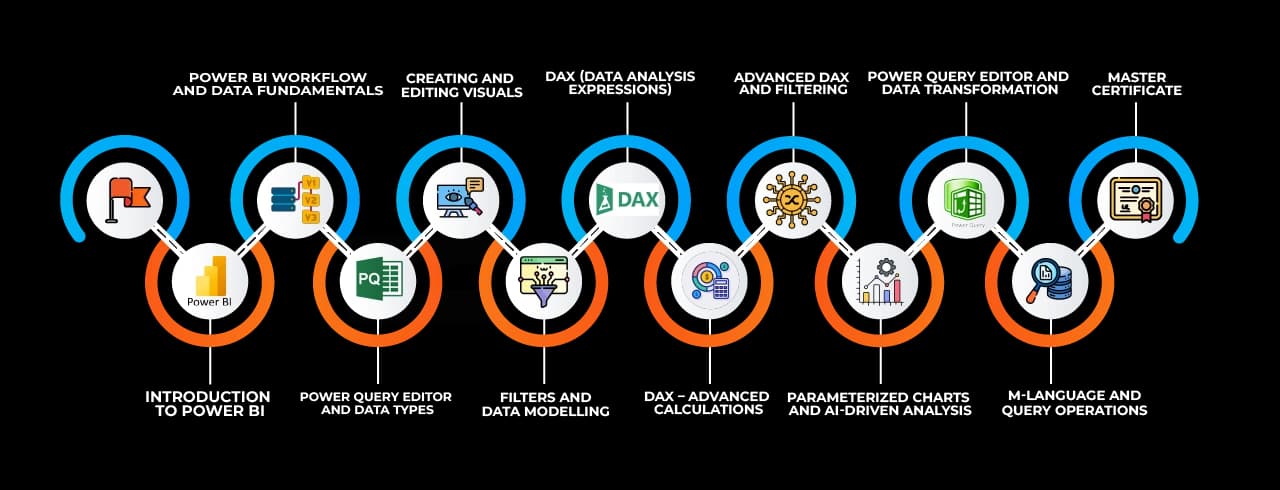
Learning Curve for Power BI

Learning curve for Power BI

Master In Power BI Course

OneCourseMultipleRoles

Empower your career with in-demand data skills and open doors to top-tier opportunities.

Junior Power BI Developer
Power BI Report Developer
Power BI Data Analyst
Business Intelligence Analyst (Power BI)
Power BI Dashboard Developer
Power BI Consultant
Power BI Specialist
Power BI Developer (ETL Focus)
Power BI Trainer
Power BI Solution Architect

Skills & Tools You'll Learn -

Data Import/Connection  iconData Import/Connection Connecting and importing data from various sources into the BI tool.
Data Transformation (Power Query) iconData Transformation (Power Query)Cleaning, shaping, and preparing data using Power Query.
Data Modeling (Relationships, Hierarchies) iconData Modeling (Relationships, Hierarchies)Creating relationships, hierarchies, and defining data structures.
Data Visualization (D3 Charts, Tables, Maps) iconData Visualization (D3 Charts, Tables, Maps)Representing data using charts, tables, and interactive maps.
Dashboards & Reports iconDashboards & ReportsDesigning and publishing interactive dashboards and reports.
Data Analysis Expressions (DAX) iconData Analysis Expressions (DAX)Writing formulas and expressions for complex calculations.
Row Level Security (RLS) iconRow Level Security (RLS)Restricting data access based on user roles and permissions.
Automation & Scheduling iconAutomation & SchedulingAutomating report updates and scheduling data refresh.
Collaboration & Sharing iconCollaboration & SharingSharing reports, dashboards, and insights with stakeholders.

Why Choose SevenMentor Power BI

Empowering Careers with Industry-Ready Skills.

Specialized Pocket Friendly Programs as per your requirements

Specialized Pocket Friendly Programs as per your requirements

Live Projects With Hands-on Experience

Live Projects With Hands-on Experience

Corporate Soft-skills & Personality Building Sessions

Corporate Soft-skills & Personality Building Sessions

Digital Online, Classroom, Hybrid Batches

Digital Online, Classroom, Hybrid Batches

Interview Calls Assistance & Mock Sessions

Interview Calls Assistance & Mock Sessions

1:1 Mentorship when required

1:1 Mentorship when required

Industry Experienced Trainers

Industry Experienced Trainers

Class Recordings for Missed Classes

Class Recordings for Missed Classes

1 Year FREE Repeat Option

1 Year FREE Repeat Option

Bonus Resources

Bonus Resources

Curriculum For Power BI

BATCH SCHEDULE

Power BI Course

Find Your Perfect Training Session

Dec 28 - Jan 3

2 sessions
28
Sun
Classroom/ Online
Weekend Batch
03
Sat
Classroom/ Online
Weekend Batch

Jan 4 - Jan 10

1 sessions
05
Mon
Classroom/ Online
Regular Batch

Jan 11 - Jan 17

1 sessions
12
Mon
Classroom/ Online
Regular Batch

Learning Comes Alive Through Hands-On PROJECTS!

Comprehensive Training Programs Designed to Elevate Your Career

Global SuperStore Dataset

Global SuperStore Dataset

Russia-Ukraine War (Humanitarian Issues)

Russia-Ukraine War (Humanitarian Issues)

Amazon Sales Analysis

Amazon Sales Analysis

Superstore Sales Data

Superstore Sales Data

Transport and Shipment (Logistics & Supply Chain)

Transport and Shipment (Logistics & Supply Chain)

No active project selected.

Transform Your Future with Elite Certification

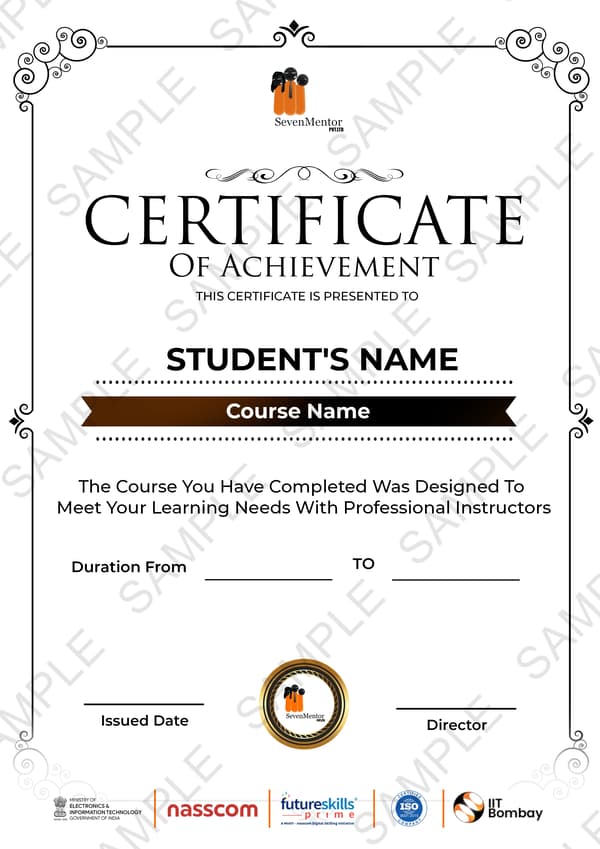
Add Our Training Certificate In Your LinkedIn ProfileLinkedIn

Our industry-relevant certification equips you with essential skills required to succeed in a highly dynamic job market.

Join us and be part of over 50,000 successful certified graduates.

Student 1
Student 2
Student 3
Student 4
Student 5
Join 15,258 others learning today
Certificate Preview

KEY Features that Makes Us Better and Best FIT For You

Expert Trainers

Industry professionals with extensive experience to guide your learning journey.

Comprehensive Curriculum

In-depth courses designed to meet current industry standards and trends.

Hands-on Training

Real-world projects and practical sessions to enhance learning outcomes.

Flexible Schedules

Options for weekday, weekend, and online batches to suit your convenience.

Industry-Recognized Certifications

Globally accepted credentials to boost your career prospects.

State-of-the-Art Infrastructure

Modern facilities and tools for an engaging learning experience.

100% Placement Assistance

Dedicated support to help you secure your dream job.

Affordable Fees

Quality training at competitive prices with flexible payment options.

Lifetime Access to Learning Materials

Revisit course content anytime for continuous learning.

Personalized Attention

Small batch sizes for individualized mentoring and guidance.

Diverse Course Offerings

A wide range of programs in IT, business, design, and more.

Course Content

About Power BI

Power BI is a powerful business analytics tool developed by Microsoft that allows users to visualize and share insights from their data. It consists of several components, including Power BI DesktopPower BI Service, and Power BI Mobile, each serving a different function in the data analysis lifecycle. Power BI Desktop is used for creating reports and data visualizations on a local machine, while Power BI Service allows for the sharing and collaboration of reports in the cloud. The tool supports various data sources like ExcelSQL Server, and Azure, enabling users to import, transform, and analyze large datasets with ease. With its intuitive drag-and-drop interface, Power BI simplifies the process of building complex data models and creating interactive dashboards. DAX (Data Analysis Expressions) and Power Query are powerful features in Power BI, enabling users to perform advanced data transformations and calculations to derive actionable insights.
 

Why Choose SevenMentor’s Power BI Course in Nashik?

  • Comprehensive Curriculum: The Power BI Course in Nashik covers all essential topics from the fundamentals of Power BI Desktop to advanced skills such as DAXdata modeling, and Power BI Service, providing a well-rounded learning experience.
     
  • Industry-Relevant Projects: Students work on real-world datasets and business-centric projects like sales analysiscustomer insights, and financial reporting, helping them gain hands-on experience with Power BI tools.
     
  • Expert Trainers: Learn from experienced and certified Power BI professionals who bring years of industry knowledge and practical experience to the training. Their guidance ensures students gain a deep understanding of both theory and practical skills.
     
  • Flexible Learning Options: Choose from online or offline Power BI Training in Nashik, with options for weekday and weekend classes, allowing you to select a schedule that best suits your personal and professional commitments.
     
  • Placement Assistance: Students who complete the Power BI Course in Nashik receive personalized placement support, including job referrals, mock interviews, and resume-building assistance to ensure they are prepared for a successful career.
     
  • Certification Preparation: The course prepares students for the Microsoft Power BI certification exam, enhancing their employability by earning an internationally recognized credential.
     
  • Study Materials and Resources: Gain access to a wealth of study materials, recorded sessions, and resources to ensure you can learn at your own pace and revisit complex topics as needed.
     
  • Portfolio Development: Work on projects that will help you build a strong portfolio showcasing your expertise in Power BI, making you a more attractive candidate to potential employers.


What Will You Learn in Power BI Classes in Nashik?

The Power BI Training in Nashik at SevenMentor is designed to provide students with in-depth knowledge of Power BI tools and techniques, including:

Introduction to Power BI: Learn how to set up Power BI Desktop, navigate the interface, and import data from various sources like ExcelSQL Server, and more.

Data Transformation with Power Query: Gain expertise in using Power Query Editor to clean, transform, and structure data for analysis, which is crucial for accurate reporting.

Creating Interactive Dashboards: Master the creation of dynamic and visually appealing Power BI dashboards that allow businesses to analyze data and make informed decisions.

Advanced DAX Functions: Learn how to use DAX (Data Analysis Expressions) to create complex calculations, build interactive reports, and add dynamic elements to your visualizations.

Power BI Service: Understand how to publish and share reports through Power BI Service, collaborate with colleagues, and manage report access and permissions.

Data Modeling and Relationships: Learn how to build effective data models by creating relationships between tables, which is essential for performing advanced data analysis.

Real-Life Business Projects: Work on projects like financial forecastingsales analysis, and marketing insights that simulate real-world business scenarios to help develop practical skills.

Certification Exam Preparation: Prepare for the Microsoft Power BI certification exam to validate your skills and enhance your job prospects in the field of business intelligence.
 

Practical Training with Real-World Applications

  • The Power BI Course in Nashik is focused on hands-on training and real-world business scenarios.
     
  • Students work on projects involving sales performance analysisdata visualization, and customer segmentation, which are directly applicable to industry requirements.
     
  • These practical exercises provide students with the experience they need to handle business challenges, allowing them to confidently use Power BI to solve complex data problems.
     
  • By completing these projects, learners gain a tangible portfolio that demonstrates their ability to transform data into valuable business insights.
     
  • With this practical approach, students can easily translate their knowledge into actionable strategies for companies looking to leverage Power BI for data-driven decision-making.


Gain In-Depth Knowledge:

  • SevenMentor’s Power BI Classes in Nashik are led by certified instructors who bring a wealth of experience in business intelligence and data analytics.
     
  • These expert trainers go beyond textbook knowledge and share real-world industry insights, providing students with a deeper understanding of how to apply Power BI in various business domains.
     
  • The trainers’ extensive backgrounds ensure that students receive high-quality education and up-to-date knowledge of the latest tools and techniques in Power BI.
     
  • By learning from experienced professionals, students can gain an edge over their peers, learning not just how to use Power BI, but also how to solve practical business problems effectively.
     
  • The interaction with trainers allows students to clear doubts, ask questions, and gain insights that would help in real-world job scenarios.


Placement Assistance After Power BI Course in Nashik

  • SevenMentor’s Power BI Course in Nashik offers valuable career support, including personalized placement assistance to help students secure roles in data analytics and business intelligence.
     
  • Students benefit from mock interviewsresume-building support, and direct job referrals, ensuring they are ready to enter the competitive job market.
     
  • The course also prepares students for the Microsoft Power BI certification, a credential that boosts employability and helps individuals stand out in the job market.
     
  • SevenMentor’s strong industry connections with top companies in data analyticsfinance, and business intelligence provide students with ample job opportunities post-training.
     
  • Whether you are aiming for roles such as data analystbusiness analyst, or Power BI developer, the skills and certification gained from this course will open the door to numerous career opportunities.


Online Course

Our online Power BI course in Nashik is designed for individuals who want to learn through hands-on experience while gaining a globally recognized certification. With an emphasis on practical learning, this course allows you to work on real-world projects and receive immediate feedback. As you progress, you'll develop a deep understanding of the subject and be prepared to apply your skills in a professional setting. The course is structured to fit around your lifestyle, offering flexibility to learn at your own pace. Upon completion, you will receive a certification that will help you stand out in the competitive job market. Join our online Power BI Training in Nashik today and start your journey towards career advancement.
 

Corporate Training

Our customized Corporate Power BI Training in Nashik is designed to align with your organization's specific goals and business needs. With a focus on actionable insights, this training teaches employees how to use Power BI to convert data into strategic information. The Corporate Power BI Course in Nashik covers key topics like data visualization, DAX, data modeling, and report sharing, ensuring your team has the skills to create insightful dashboards and reports. Through hands-on learning and expert guidance, employees will gain the expertise required to tackle data-related challenges and contribute to informed decision-making in your organization.

Frequently Asked Questions

Everything you need to know about our revolutionary job platform

1

What qualifications do you need to take the Power BI course?

Ans:
Students must have a high school diploma or an undergraduate degree. A passion for data visualisation and a drive to learn more about Power BI's applications in data science are also strongly encouraged.
2

What purpose does Power BI serve?

Ans:
Microsoft Power BI is a business intelligence application for analysing, visualising, and sharing data. It is used to generate decision-supporting reports and dashboards.
3

Is Power BI a self-service business intelligence tool?

Ans:
Businesses must use tools like Power BI, which converts data into easily analysable information, to transform data into business value through a self-service paradigm.
4

Is AI used in Power BI?

Ans:
Integration of AI with PowerBI - Power BI includes AI tools like as automatic pattern discovery, predictive analytics, and machine learning.
5

Is coding required with Power BI?

Ans:
Power BI does not require programming. Instead, it employs formula languages such as DAX and M. While they do not provide access to the full range of coding languages, their breadth of capabilities is adequate for data transformation, modelling, and visualisation with Power BI.
6

What is the tool for Power BI?

Ans:
"Power BI" is a tool, a business intelligence platform developed by Microsoft that allows users to analyse and visualise data from many sources, providing interactive insights for informed decision-making.
7

Does Power BI require SQL?

Ans:
It is not required to understand SQL for Power BI, however, it is strongly encouraged. Using Power BI without SQL is like using a limited application. You will have to execute tasks such as data cleansing manually, and you will have limited access to data transformations.
8

Is Power BI superior to Tableau?

Ans:
Whether Power BI is "better" than Tableau depends on your specific needs, but Tableau is frequently regarded as superior for advanced data visualisation and handling large datasets, whereas Power BI shines with its user-friendly interface, affordability, and seamless integration with other Microsoft products, making it a better choice for beginners or organisations heavily invested in the Microsoft ecosystem.
9

Which BI tool is most popular?

Ans:
Use Microsoft Power BI, a well-known business intelligence application made by Microsoft. This is downloadable software, allowing you to run analytics in the cloud or on a reporting server.
10

Should I learn Salesforce or Power BI?

Ans:
The decision between the two is driven by the specific business use case. Power BI is very good at data analysis and visualisation. Salesforce, on the other hand, is the preferred tool for gathering insights from customer connections and implementing processes.
11

Is it possible to acquire a job in SevenMentor Placement using solely Power BI?

Ans:
If you want to work in analytics or business intelligence, Power BI is a great skill to have on your CV. Power BI not only provides a range of job prospects but it is also an important ability for long-term career advancement.
12

Which skills are needed for Power BI in a placement?

Ans:
Power BI requires data visualisation, modelling, and analytics expertise. SQL and computer language skills can also be useful.
13

Which skills are needed for Power BI?

Ans:
Data modelling, data conversions, the DAX language, data visualisation, and architecture are among the skills required. This brings the entire concept into balance by emphasising the value of both hard and soft talents. So, begin your learning adventure with Simplilearn's Power BI Certification Training Online course.
14

What exactly are the talents of a business intelligence developer?

Ans:
A business intelligence developer should be a member of the programming and software engineering teams, with extensive expertise of data modelling, data management, data design, and data visualisation.
15

Is Power BI a viable career path?

Ans:
Organisations are actively hiring Power BI Developers, Business Intelligence Analysts, and Data Analysts to help them turn their data into meaningful insights. Whether you're an aspiring data enthusiast or a seasoned professional eager to advance your career, a Power BI career provides a bright future.

Explore Other Demanding Courses

No courses available for the selected domain.