Stop Guessing GPU Configs: Build Production-Grade AI Infrastructure at SevenMentor
Anyone who has spent enough time around GPU workloads eventually runs into the same kind of problem. You launch the job and everything looks fine for a few minutes. Then PyTorch throws a CUDA out of memory error and now you are staring at the batch size while also wondering whether moving from a p3.2xlarge to a larger instance is actually going to fix anything.
The same thing happens on bare-metal systems. You run nvidia-smi expecting an obvious answer and end up looking at memory usage and GPU utilisation and processes that do not seem to explain why a multi-GPU training job is scaling badly.
That is the part of GPU infrastructure work that gets missed in most beginner material.
GPU Cloud Computing is not simply about starting a Jupyter Notebook on a T4 and getting a model to run. Once workloads become larger you have to think about driver compatibility and container runtimes and GPU scheduling and network throughput and what happens when a node disappears halfway through a job. Cost starts mattering too. Idle VRAM is still money being spent.
The GPU Cloud & AI Infrastructure Engineer Course at SevenMentor is built around those problems rather than spending most of the training on broad cloud theory. You work through the parts that tend to cause trouble in real environments including CUDA compatibility and NVIDIA Container Toolkit issues and scheduler behaviour and Kubernetes GPU workloads and the less obvious costs sitting inside an apparently healthy cluster.
Introduction to the Course and Its Curriculum
A lot of cloud training stops once an instance has been launched successfully.
That is really the beginning of the work.
This course follows an AI workload through its actual operating cycle:
Provision → Containerize → Orchestrate → Observe → Optimize
The order matters because problems rarely stay inside one layer. A driver mismatch can look like a container problem. A scheduling decision can leave GPUs underused. A poorly configured workload can make a perfectly good H100 look like an expensive paperweight.
You work through those failures directly rather than only reading about them.
Module 1: The Hardware & Virtualization Layer
We start close to the hardware because GPU architecture eventually affects the decisions you make higher up the stack. You compare Pascal and Volta and Ampere and Hopper and look at why differences in NVLink topology can matter for distributed workloads.
The module also covers MIG on A100 and H100 systems along with SR-IOV and vGPU considerations. You configure the NVIDIA GPU Operator and Device Plugin on Kubernetes and work through issues involving nvidia-container-toolkit rather than stopping after the initial installation.
Module 2: Container Runtimes & Driver Management
Drivers inside Docker images can create problems later when workloads move between environments. Here the focus is on using the NVIDIA Container Toolkit properly and managing driver versions through the GPU Operator driver DaemonSet.
You also work through CUDA compatibility questions that come up constantly in practice. For example a PyTorch 2.1 environment may expect CUDA >=11.8 while the underlying image or host setup is still carrying an older version.
Rootless HPC containers using enroot and pyxis are covered too.
Module 3: Orchestration at Scale — Kubernetes + Slurm
This is where the infrastructure starts getting genuinely interesting.
You work with Kueue and Volcano for gang scheduling and run distributed workloads using PyTorch Distributed and DeepSpeed and FSDP. Alongside that you look at Slurm-based HPC workloads and use the slurm-operator when traditional workloads do not fit neatly into a container-first setup.
Quota management and priority classes and preemption become practical problems here. A low-priority training job should not be allowed to interfere with a production inference endpoint simply because both happen to need GPUs at the same time.
Module 4: Cloud-Native Implementations — AWS, Azure and GCP
The course does not stop at comparing cloud instance names.
You provision Google Cloud GPU resources through Terraform and work with local SSDs for checkpointing on A3 Mega machines. GKE Autopilot and Standard are compared where GPU workloads make the trade-offs relevant.
On AWS you work with a p4d.24xlarge cluster and configure EFA through the aws-efa-k8s-device-plugin. RDMA performance can then be compared with standard ENI networking rather than treating the two as interchangeable.
For burst capacity you also look at Karpenter and GPU-specific tolerations and node-pool drift. These are the details that start mattering once a cloud GPU environment is doing more than running one experiment.
Module 5: Inference Serving & Day 2 Operations
Training tends to get most of the attention.
Inference is where the infrastructure has to keep paying for itself.
You deploy vLLM and TensorRT-LLM behind Triton Inference Server and work with dynamic batching and KV-cache offloading. Monitoring moves beyond basic CPU and memory dashboards too. Prometheus and Grafana are used to watch GPU metrics such as SM utilisation and memory bandwidth and NVLink errors and DCGM exporter alerts for Xid failures.
There is also a FinOps layer. Using Kubecost or CloudHealth you look at GPU-hour usage by namespace and start asking the uncomfortable question every production team eventually asks: where exactly is the GPU budget going?
Capstone Project
The final project pulls the pieces together.
You design a multi-region and multi-cloud inference platform for a 70B parameter model with a target of 10k RPS and less than 100 ms p99 latency while working within a defined hourly budget.
The deliverables are not just slides.
You produce the architecture and the Terraform and the Helm charts and the post-mortem from the load test.
That gives you something much more useful to discuss than a finished lab where nothing was ever allowed to fail.
Career Path & Salary Realities
There is no single route into GPU and AI infrastructure work. Some engineers come in through DevOps and later move toward ML platforms. Others start with cloud infrastructure and end up working much closer to model training and serving.
A rough picture of the progression looks like this:
Experience Tier
Common Title
Pune Salary Range (INR)
Primary Focus
0–2 years
Junior GPU / Cloud Engineer
₹6.5L – ₹12L
Cluster setup and monitoring and support work
3–5 years
Senior GPU / ML Infra Engineer
₹18L – ₹32L
Architecture and multi-cloud infrastructure and cost control
6–10 years
Lead / Principal Infra Engineer
₹38L – ₹65L
Technical roadmap and vendor choices and team leadership
Remote roles with US companies can sit considerably higher. Mid-level and senior positions are often around $130K–$220K but those numbers usually come with a fairly strict expectation of having worked on production systems already. Someone who has helped ship an inference pipeline handling real traffic is going to have a very different conversation with a recruiter than someone whose experience stops at lab work.
Most people do not land in the senior bracket immediately.
A fairly common route starts with DevOps or cloud work and then shifts toward ML infrastructure after enough time spent dealing with GPU workloads and scheduling problems. Simply knowing Google Cloud GPU instances is not much of a differentiator anymore. What gets more interesting is whether you can figure out why a distributed training run has been sitting at step 1,400 for twenty minutes without making the situation worse.
What Are the Benefits of This Course and Career?
Knowing how to run docker run --gpus all gets you started. It does not tell you what to check when the same command fails on a GKE node because the Containerd runtime is using the wrong config.toml setup.
That gap is where a lot of the useful learning happens.
Immediate Technical Leverage
By the end of the course you have actual infrastructure work to point to. That can include Terraform modules using google_compute_instance with guest_accelerator configuration and Helm values for the NVIDIA GPU Operator and Karpenter NodePool definitions for GPU workloads.
Those files are useful for more than showing in a portfolio. You can take the patterns and adapt them to work you are doing elsewhere.
Career Trajectory: Platform Engineering & MLOps
GPU infrastructure sits in a fairly useful space between Platform Engineering and MLOps. Depending on your experience you could move toward roles such as:
AI Infrastructure Engineer ($160k–$240k base): Working on the internal GPU platform used by data science and ML teams.
ML Platform Engineer: Looking after the Kubernetes infrastructure used for training and serving through tools such as Kubeflow and MLflow and Ray.
HPC/Cloud Architect: Designing setups where on-premise Slurm environments can use cloud GPU capacity when additional compute is needed.
The “Hidden” Skill: Cost Governance
A GPU that nobody is using is still costing money.
One bad nodeSelector can leave an H100 running through a weekend when nobody is using it. The course looks at ways of dealing with that through scale-to-zero approaches and spot diversification and MIG partitioning.
For example you can split an A100 across several smaller inference workloads instead of leaving most of the hardware unused.
That kind of cost awareness is useful because GPU infrastructure has a very different spending profile from ordinary cloud workloads. FinOps for accelerated compute can become a surprisingly valuable skill during salary discussions too.
Certification Alignment
The curriculum is mapped around the NVIDIA Certified Associate: AI Infrastructure and Operations as well as the CKA.
There is a strong practical focus on GPU-specific Kubernetes troubleshooting including workflows around kubectl debug node.
The idea is not to spend weeks memorising questions for an exam. The lab environment gives you the kind of problems you are likely to encounter when actually operating the infrastructure.
Why Choose the GPU Cloud & AI Infrastructure Engineer Course at SevenMentor?
You can learn how to install an NVIDIA driver from a video.
What a video cannot really give you is the experience of finding a node-pod affinity problem on a multi-GPU machine and then working out why the scheduler made that decision.
That difference matters when the work moves beyond a basic setup.
Real Hardware, Real Failures
SevenMentor maintains a dedicated lab environment with 4 NVIDIA DGX A100 systems with 640GB of combined VRAM along with 2 HGX H100 nodes and additional burst capacity through GCP and AWS.
The point of having that setup is not just to show impressive hardware.
You can run into actual NVLink errors. You can investigate ncclTimeout behaviour caused by a faulty DAC connection. You can also see thermal throttling while running llama.cpp benchmarks on an H100.
Those are awkward problems.
They are also the sort of problems you remember after you have fixed them yourself.
Instructors Who Run Production Systems
The lead instructor Ravi Kumar has worked on GPU platform architecture for a major Indian fintech company handling more than 5M inference requests per day. Instead of keeping the discussion at the documentation level he can walk through actual scheduler work and the reasoning behind topology-aware GPU scheduling.
The second instructor Priya Sharma works with Google Cloud GPU quota processes for enterprise accounts and brings that operational side into the classroom too.
The benefit is fairly simple.
You get to hear how these problems are handled when there is an actual team and an actual production workload behind them.
Curriculum Velocity
AI infrastructure changes quickly.
A driver update can create compatibility trouble for an older CUDA environment. A Kubernetes release can change behaviour that a GPU operator depended on. An update to vLLM can also affect an existing inference setup.
That means the lab environment cannot stay frozen for years.
SevenMentor updates its lab manifests quarterly and the Terraform providers used in training are kept current rather than relying on versions that have already become outdated.
The “Unblocked” Policy
A CrashLoopBackOff at 10 PM is not particularly useful when nobody is around to help you figure out what caused it.
Learners can use the cohort Slack channel to raise problems outside the classroom. Instructors or teaching assistants can step in when someone gets stuck on issues such as dcgm-exporter failures or Kubernetes configuration problems.
Lab access also continues after the formal course period so students have time to finish the capstone or use the environment while preparing for interviews.
Placement That Matches the Stack
The placement side is focused on roles that actually relate to the skills covered in the course instead of pushing every learner toward a generic developer opening.
The placement team works with platform-focused hiring pipelines involving companies such as Jio Platforms and Razorpay and Zerodha and Fractal Analytics as well as global captive teams including Goldman Sachs and JP Morgan and Walmart Labs.
Technical interviews are also shaped around the stack.
You are more likely to get asked how you would deal with GPU fragmentation in a multi-tenant cluster than a basic question such as “What is a pod?”
Ready to Stop Debugging Drivers and Start Building Platforms?
The next cohort starts on [Insert Date] and seats are limited to 18 engineers so everyone gets meaningful access to the H100 systems during the distributed training work.
What Happens After You Enroll?
1. Pre-course access:
You receive VPN access to the lab environment and run a Day 0 validation script. It checks kubectl and helm and terraform and your gcloud or aws CLI authentication so basic setup issues do not eat into the first class.
2. Live hardware walkthrough:
There is a dedicated two-hour session covering the physical setup before the practical work begins. That includes cabling and top-of-rack switches and DCGM telemetry endpoints.
3. Slack and alumni access:
You are added to the private cohort channel along with the alumni network which currently includes more than 400 engineers in active roles.
There is no need to go through a long sales process just to understand what the course covers.
You should already have Linux administration basics and some Docker and Kubernetes fundamentals and familiarity with Terraform syntax. From there the course gets into the GPU-specific side of the work.
And when you have questions about the hardware or curriculum you can raise them directly rather than trying to get an answer from an automated chatbot.
SevenMentor nowadays also offers integrated learning paths with courses such as:
Learning these technologies can significantly boost your career prospects.
Frequently Asked Questions
How long does the GPU Cloud course in Pune take if I am working full time?
The weekend track runs for 14 weeks while the intensive weekday option takes about 12 weeks. Around 8–10 hours a week is a reasonable amount to keep aside once lab practice is included.
What will I actually build during the AI infrastructure course?
You work toward an end-to-end inference setup on H100 hardware and also configure multi-node distributed training with KubeRay. There is a deliberately broken cluster exercise too where you have to find the problem instead of being shown the answer.
I have never worked with GPUs before. Is that going to be a problem?
Not necessarily. Previous GPU experience is not required but being comfortable in the Linux command line and knowing basic Docker will make the early sessions easier. Kubernetes fundamentals are also covered before the more involved GPU scheduling work.
Is the course mainly focused on Google Cloud or do AWS and Azure come in too?
Google Cloud gets the largest share of the lab work at roughly 60% with topics around Vertex AI and Compute Engine GPU machines and GKE. AWS and Azure make up the remaining portion at around 20% each.
Does the GPU cloud training in Pune include placement support?
Yes. Support includes resume reviews and mock interviews and referrals through hiring partners. Getting a particular role still depends on your experience and interview performance but the training is aimed at roles in cloud infrastructure and platform engineering and AI-focused teams.
Are there weekend batches for engineers who already have jobs?
Yes. The weekend schedule runs on Saturday and Sunday from 9 AM to 1 PM and is designed around professionals who are already working full time.
How much does the GPU cloud certification course cost?
Pricing can change based on the track and cohort size. For the current fee and EMI options and any active early-bird offer you would need to check with the SevenMentor admissions team.
 Boost Your IT Career with Hands-On Cloud Computing Training by SevenMentor
 Stay Ahead in the Digital Era with Advanced Cloud Computing Skills
 Learn Cloud Deployment, Management, and Automation from Expert Trainers
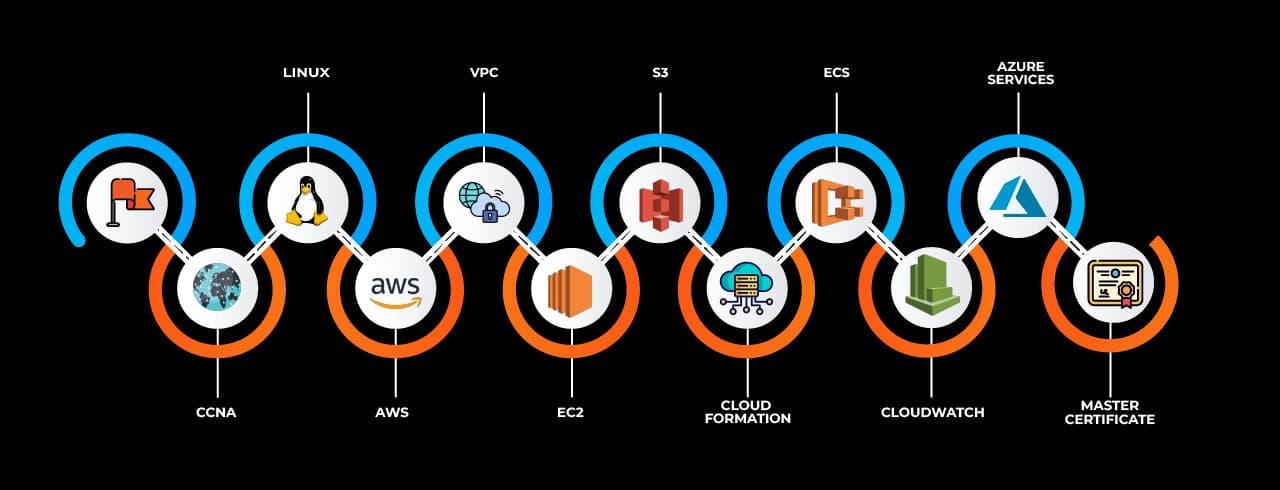
 AWS SDKsSoftware development kits that allow developers to integrate AWS services into applications using various programming languages.
 CloudWatch A monitoring service that collects and analyzes logs, metrics, and events for AWS resources and applications.
 CloudTrail A service that records AWS API calls for governance, compliance, and operational auditing.
 IAM (Identity and Access Management) A security service for managing user access, permissions, and authentication in AWS.
 Cognito A service for adding authentication, authorization, and user management to web and mobile applications.
 Inspector An automated security assessment service that detects vulnerabilities in AWS workloads.
 Macie A data security service that uses AI to discover and protect sensitive data across AWS.
 CloudHSM A managed hardware security module for cryptographic key storage and encryption.
 CloudFormation An infrastructure-as-code service that automates the provisioning of AWS resources using templates.
 OpsWorks A configuration management service that automates deployments using Chef and Puppet.
 CodeDeploy A service that automates application deployments across AWS and on-premises environments.
 CodePipeline A CI/CD service that automates the build, test, and deployment processes for applications.
 Elastic BeanstalkA platform-as-a-service (PaaS) that simplifies application deployment and management.
 DynamoDB A fully managed NoSQL database service for high-speed and scalable applications.
 IaaS (Infrastructure as a Service)A cloud model that provides virtualized computing resources over the internet.
 PaaS (Platform as a Service)A cloud model offering development and deployment environments without managing infrastructure.
 SaaS (Software as a Service)A cloud model where software applications are delivered over the internet on a subscription basis.
 AWS Management ConsoleAn easy-to-use web-based console of AWS services and resources
 AWS CLI A command-line interface tool that automates various AWS-related processes through the execution of commands and scripts.
 S3 (Simple Storage Service)A flexible object storage service designed for secure data storage and retrieval.
 EBS (Elastic Block Store)A robust block storage service tailored for EC2 instances.
 RDS (Relational Database Service)A fully managed relational database service that supports various database engines.