Introduction
The concept of working from home has transformed from a temporary trend into a long-term lifestyle choice. Whether you’re a freelancer, entrepreneur, or remote employee, your home office can make or break your productivity. A well-designed home office is not just about aesthetics — it’s about creating a space that enhances focus, reduces stress, and promotes efficiency.
In this blog, we’ll guide you step-by-step on how to design a home office that inspires productivity and helps you achieve work-life balance
1. Choose the Right Location
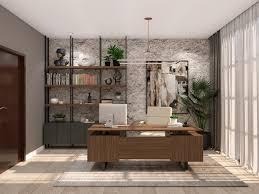
The first and most important step in designing a home office is selecting the right spot. Avoid setting up your workspace in high-traffic areas like the living room or kitchen, where distractions are inevitable.
If you have an extra room, convert it into a dedicated office. If not, a quiet corner in your bedroom or hallway can work — as long as it’s away from noise and interruptions.
Tips:
- Pick a space with minimal household movement.
- Ensure you have a power outlet nearby for your computer and other devices.
- Try to choose a location with natural light — it boosts mood and alertness.
2. Focus on Ergonomics
Ergonomics is the foundation of a productive and healthy workspace. Sitting for long hours in an uncomfortable chair can cause back pain, fatigue, and poor posture — all of which can decrease your efficiency.
Key Essentials:
- Chair: Invest in an ergonomic chair with lumbar support. Your feet should rest flat on the floor, and your knees should be at a 90-degree angle.
- Desk: The desk height should align with your elbows when your arms are at rest. Adjustable desks or standing desks are great for flexibility.
- Monitor: The top of your monitor should be at eye level, about 20–30 inches away from your face.
Pro Tip: Use a laptop stand and external keyboard to achieve correct alignment.
3. Light It Right
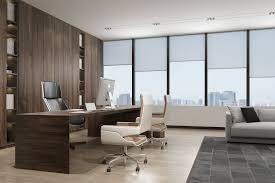
Lighting plays a major role in how productive and comfortable you feel. Poor lighting can lead to eye strain, headaches, and fatigue.
Types of Lighting:
- Natural Light: Position your desk near a window to take advantage of daylight.
- Task Lighting: Add a good desk lamp with adjustable brightness.
- Ambient Lighting: Soft overhead lights help create balance and reduce harsh shadows.
Avoid direct glare on your computer screen and consider using daylight LED bulbs to mimic natural light.
4. Declutter and Organize
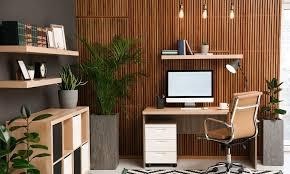
A cluttered desk often leads to a cluttered mind. Keeping your workspace clean and organized can dramatically improve your concentration and mental clarity.
Ways to Stay Organized:
- Use storage boxes, shelves, or drawer organizers to keep things in order.
- Limit the number of items on your desk to only the essentials — laptop, notebook, and a pen holder.
- Schedule 10 minutes at the end of each day to tidy up your space.
Minimalism isn’t just a trend — it’s a productivity booster.
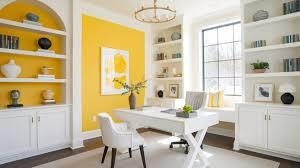
5. Choose the Right Colors
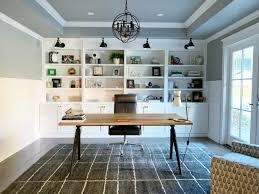
Colors have a psychological effect on your mood and focus. The right palette can motivate and energize you, while the wrong one can make you feel dull or anxious.
Productive Color Choices:
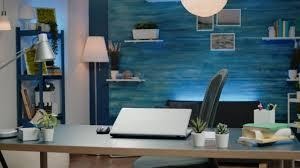
- Blue: Enhances focus and calmness.
- Green: Reduces stress and creates balance.
- Yellow: Inspires creativity and positivity.
- White or Neutral tones: Promotes clarity and spaciousness.
Avoid overly bright or dark tones that may strain your eyes or make the room feel smaller.
6. Add a Touch of Nature
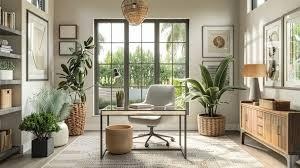
Bringing nature indoors can have a powerful impact on your well-being. Studies show that indoor plants can boost productivity, creativity, and air quality.
Simple Green Additions:
- Desk plants: Snake plant, peace lily, or succulents are low-maintenance and perfect for desks.
- Natural materials: Incorporate wooden furniture or woven baskets to add warmth.
- View: If possible, position your desk to face a window or greenery outside.
7. Personalize Your Space
Your home office should reflect your personality and style. A few personal touches can make the space more inviting and motivating.
Ideas to Personalize:
- Display motivational quotes or framed artwork.
- Add a vision board or corkboard to track your goals.
- Use stylish stationery or matching organizers.
- Play soft background music or ambient sounds if it helps you focus.
However, keep personal elements minimal to avoid distractions.
8. Manage Cables and Technology Smartly
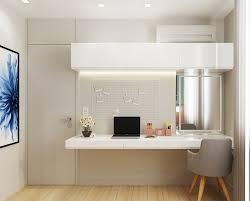
Tangled cables can make even a beautiful workspace look messy. Invest in cable organizers or wireless devices to keep your tech setup clean and efficient.
Smart Tech Tips:
- Use Bluetooth keyboards and mice for less clutter.
- Install power strips under the desk to hide cords.
- Keep charging stations or USB hubs easily accessible.
- Regularly back up data and keep software updated for seamless workflow.
9. Control Noise and Distractions
One major challenge of working from home is dealing with background noise — from doorbells to neighborhood sounds. Creating a distraction-free zone is essential for deep focus.
Noise Control Ideas:
- Use noise-canceling headphones or white noise apps.
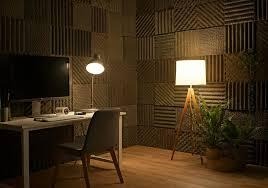
- Add thick curtains, rugs, or acoustic panels to absorb sound.
- Set clear boundaries with family during work hours.
If possible, play light instrumental music to maintain focus and creativity.
10. Maintain Work-Life Balance
When your home doubles as your office, the line between work and personal life can blur easily. Design your workspace in a way that allows you to mentally “switch off” after work.
How to Separate Work and Home Life:
- Have a clear start and end routine every day.
- Keep your office supplies and laptop out of sight after work hours.
- If space allows, close the door to your office once your day is done.
- Take short breaks and stretch to prevent burnout.
A balanced environment leads to better mental health and sustainable productivity.

Conclusion
Designing a home office for productivity is about much more than just picking stylish furniture. It’s about crafting a space that supports your physical comfort, mental clarity, and professional growth.
Whether your workspace is a full room or a cozy corner, with the right setup, you can create an environment that fuels focus, creativity, and balance.
Remember: productivity starts with how your environment makes you feel. Design your home office not just to work — but to thrive.
Related Links:
Do visit our channel to know more: SevenMentor
Author:-
Shradhha Pachorkar
Shraddha Pachorkar
Expert trainer and consultant at SevenMentor with years of industry experience. Passionate about sharing knowledge and empowering the next generation of tech leaders.
All articles by Shraddha Pachorkar